Blog / Guide
How to Withdraw From Polymarket: Step-by-Step Guide (2026)
Withdrawing from Polymarket is fast and free — if you know what you're doing. Here's exactly how to cash out your USDC, plus what to watch for to avoid losing funds.
How to Withdraw From Polymarket
Polymarket withdrawals are fast, cheap, and don't require Polymarket's approval — your funds are already in a smart contract on Polygon, so withdrawing just means moving them to a wallet or exchange you control.
The whole process takes about 5 minutes if you know what you're doing. Here's exactly how.
Before You Withdraw
You'll need two things:
- A destination wallet address that supports USDC on the Polygon network — this can be a personal wallet (MetaMask, Coinbase Wallet, Trust Wallet) or an exchange address (Coinbase, Kraken, Binance)
- A small amount of MATIC for gas fees on Polygon (usually under $0.10 worth)
If you funded your Polymarket account with an email signup, Polymarket created a wallet for you automatically. You can withdraw to any external Polygon-compatible address.
Step 1: Open the Withdrawal Page
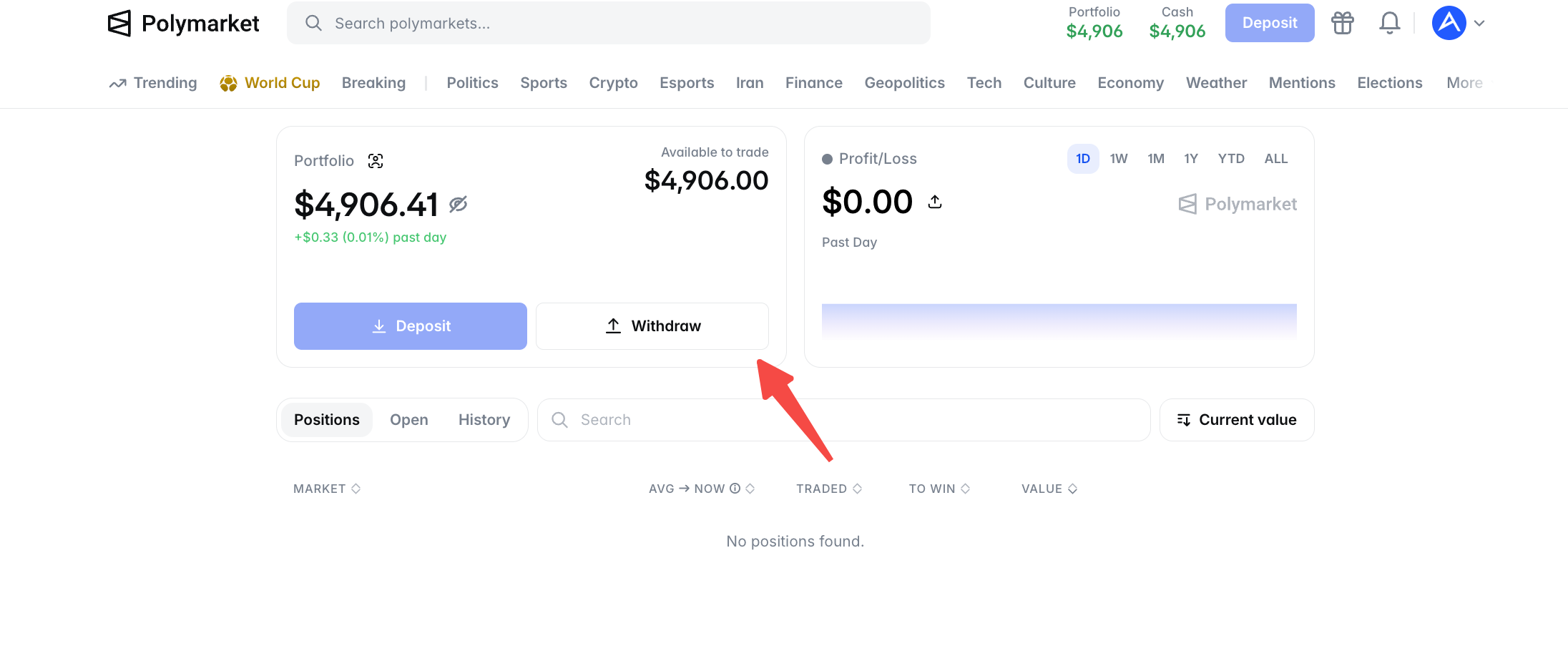
Log into your Polymarket account. Click your profile icon (top right) and select Withdraw or Cash Out.
You'll see your available USDC balance. Make sure you don't have any open positions — those funds are locked until the positions resolve or you close them manually.
Step 2: Choose Your Withdrawal Method
You have two paths:
Crypto withdrawal (recommended) — Send USDC directly to any Polygon-compatible wallet. Fast, cheap, no extra steps.
Bank withdrawal (limited regions) — Convert USDC to fiat and send to a linked bank account. Available in select regions, slower, and adds a conversion fee.
For 90% of users, crypto withdrawal is the right choice. We'll walk through that.
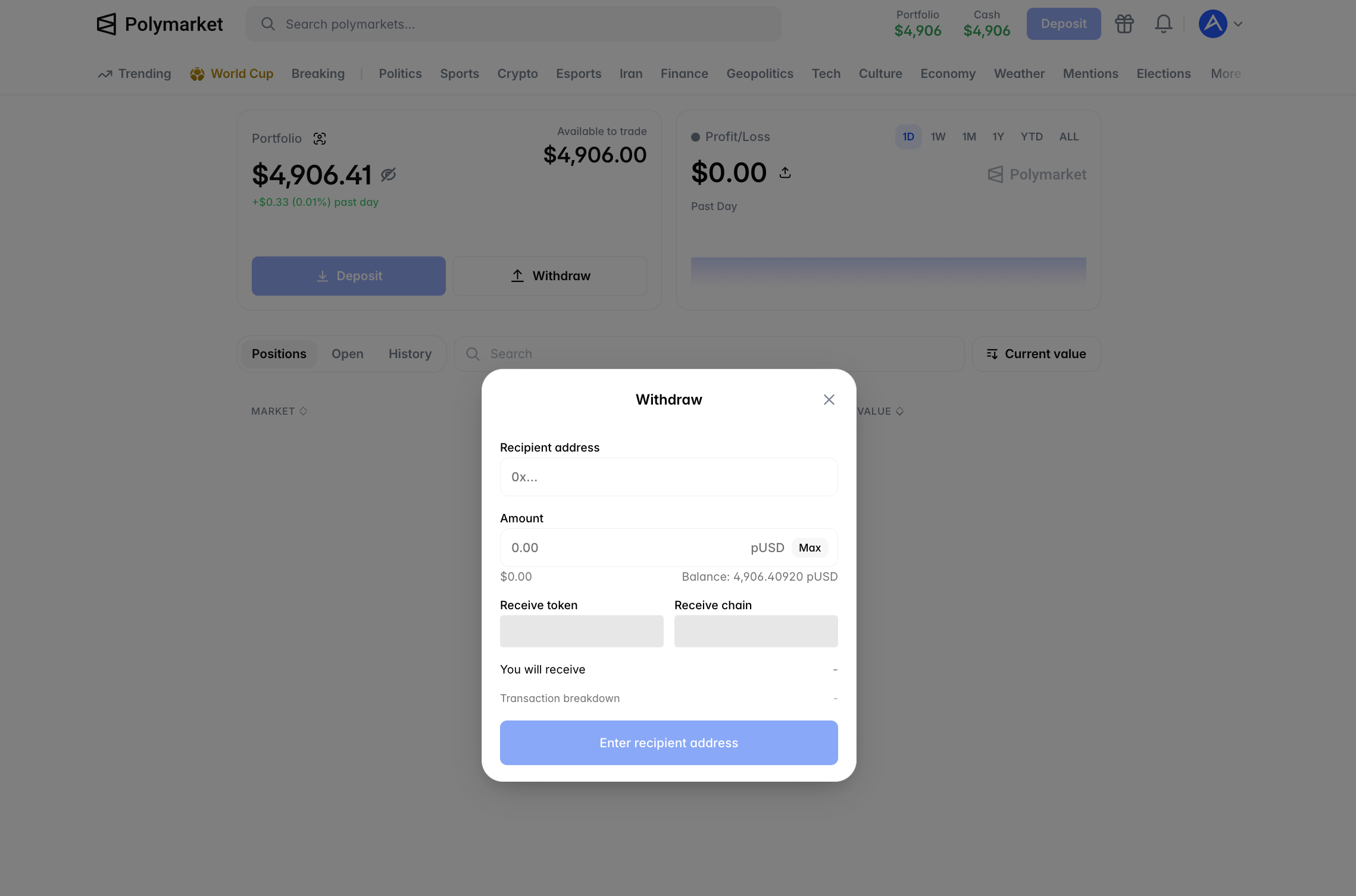
Step 3: Enter the Destination Address
Paste the address you want to withdraw to. Triple-check this address — crypto transactions are irreversible. If you send to the wrong address, the funds are gone.
A few things to verify:
- Does the address start with
0x(Ethereum/Polygon format)? - Did you copy the full address, not just a partial one?
- Does the receiving wallet/exchange support USDC on Polygon specifically? Not all do.
Step 4: Enter the Amount and Confirm
Enter how much USDC you want to withdraw. You can withdraw your full balance or a partial amount.
Polymarket shows the gas fee before you confirm — usually a few cents in MATIC. If you don't have any MATIC, you can usually pay gas in USDC (Polymarket sponsors this on some withdrawals).
Click Confirm. Your withdrawal will process on-chain within 1-2 minutes.
Step 5: Verify Receipt
Check your destination wallet or exchange. USDC should arrive within 1-2 minutes after Polymarket processes the transaction.
If you withdrew to an exchange, the funds may show as "pending" briefly while the exchange confirms enough block confirmations on Polygon. This usually takes under 5 minutes.
Want to grow your balance instead of withdrawing it? PolyCop copies top Polymarket traders automatically →
Common Withdrawal Mistakes
1. Sending to the wrong network.
This is the #1 way users lose funds. USDC exists on multiple chains — Ethereum, Polygon, Arbitrum, Avalanche, Solana. Polymarket only supports Polygon withdrawals. If you send to a wallet that doesn't recognize Polygon USDC, the funds may not show up.
Fix: Always confirm your destination wallet supports USDC on Polygon network before withdrawing. When withdrawing to an exchange, specifically look for "USDC (Polygon)" or "USDC.e (Polygon)" in their deposit options.
2. Trying to withdraw funds locked in open positions.
If your USDC is committed to a Yes/No position, you can't withdraw it until you either close the position manually or wait for the market to resolve.
Fix: Close positions or wait for resolution. Check your portfolio for any open trades before attempting a withdrawal.
3. Not having MATIC for gas.
Polygon transactions need tiny amounts of MATIC for gas. If your account has 0 MATIC and Polymarket doesn't sponsor gas for your withdrawal, the transaction fails.
Fix: Keep a small amount of MATIC ($1-2 worth) in your Polymarket wallet, or use Polymarket's USDC-paid gas option when available.
4. Withdrawing to a centralized exchange that doesn't support Polygon USDC.
Some smaller exchanges only support USDC on Ethereum. If you withdraw to them on Polygon, the funds may be unrecoverable.
Fix: Major exchanges (Coinbase, Kraken, Binance, OKX) all support Polygon USDC. Use these instead of smaller platforms.
How Long Does a Withdrawal Take?
On-chain confirmation: 1-2 minutes on Polygon Exchange deposit credit: Usually under 5 minutes after on-chain confirmation Total time: Most withdrawals complete in under 10 minutes
If your withdrawal hasn't arrived after 30 minutes:
- Check the transaction hash on polygonscan.com
- If the transaction shows "Success", the funds are on the blockchain — the receiving wallet/exchange is the bottleneck
- If your exchange shows "pending" longer than 30 minutes, contact their support with your transaction hash
What Are the Fees?
Polymarket withdrawal fee: $0 Polygon gas fee: Usually $0.01-0.10 worth of MATIC Receiving exchange deposit fee: Usually $0 (most exchanges credit Polygon USDC for free)
Total cost to withdraw: Typically under $0.10.
This is dramatically cheaper than withdrawing from Ethereum-based platforms ($5-50 in gas) or traditional sportsbooks (which often charge withdrawal fees and processing delays).
Converting USDC to Cash
Once your USDC reaches an exchange, you have two paths to convert to fiat:
Sell USDC for USD/EUR/GBP — Most exchanges offer direct USDC/fiat pairs. Sell on the order book or via a market order. Funds usually settle instantly.
Bank transfer — After selling, initiate a withdrawal from the exchange to your linked bank account. ACH transfers typically take 1-3 business days; wire transfers are faster but cost more.
Some exchanges (like Coinbase) let you withdraw USDC directly to debit cards via instant withdrawal — handy if you need cash quickly, but adds a small fee.
What About Taxes?
Polymarket doesn't issue tax documents. You're responsible for tracking your profits and losses and reporting them to your local tax authority.
In most jurisdictions, prediction market profits are treated as short-term capital gains or gambling income, depending on local rules. Keep records of:
- Total deposits
- Total withdrawals
- Realized gains/losses per market
Consider using a crypto tax tool that supports Polygon transactions to automate this.
When Should You Withdraw?
Withdraw if:
- You hit a profit target and want to lock in gains
- You need the funds for something else
- You're stepping back from trading temporarily
Consider holding USDC in Polymarket if:
- You actively trade and will redeploy capital soon
- Withdrawing and re-depositing would waste time
- You're running a copy trading strategy that benefits from continuous capital
For active copy traders, keeping a working balance in Polymarket makes sense. For users taking profits or stepping back, withdrawing makes more sense.
The Bottom Line
Polymarket withdrawals are fast, cheap, and reliable — if you double-check the destination address and confirm Polygon network support. The platform doesn't gatekeep your funds. The whole process is closer to moving crypto between two wallets than to withdrawing from a traditional broker.
If you withdraw and then want to keep growing your account, copy trading is the lowest-effort path back in. PolyCop mirrors top Polymarket traders automatically — proven wallets, transparent on-chain history, real-time execution.
Start Trading Smarter
Ready to grow your account instead of withdrawing? PolyCop tracks profitable Polymarket wallets and copies their trades automatically. No coding required.